10 Best Clipping Software for 2026
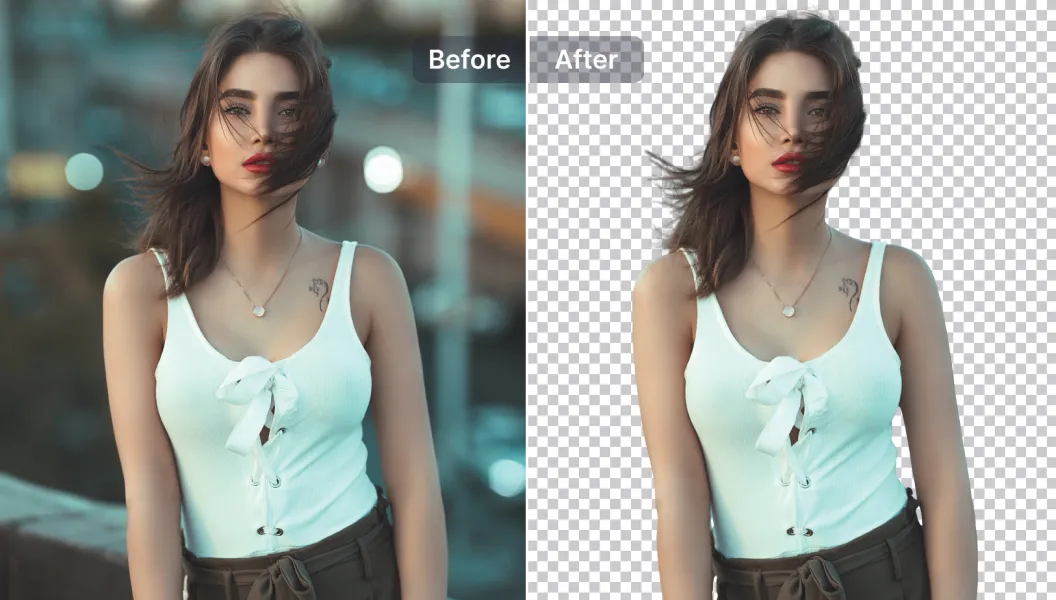
Clipping software is essential for photographers, designers, marketers, and anyone who needs clean cutouts or precise background removal. In 2026, the best tools combine high-detail masking with AI-powered automation to save time while preserving accuracy. These platforms help users clip hair, edges, products, and complex subjects with greater ease.
Below are the ten best clipping software options for 2026, what they’re best at, and who they suit.
Adobe Photoshop
Photoshop remains the strongest choice for precise clipping paths, advanced selection tools, and detailed masks. It provides full control over edges, transparency, and refinement, making it ideal for professionals working on product images, portraits, or composite design.
Its level of control is unmatched, though it does require more experience compared to simpler automatic tools.
Canva Pro
Canva Pro includes a very fast background remover that works well for social graphics, marketing materials, and simple cutouts. It’s popular among creators who need quick results and an easy workflow without technical complexity.
While not as exact as professional tools for hair or fine details, it offers convenience and speed for everyday visuals.
Clipping Magic
Clipping Magic focuses specifically on background removal and clipping. Its tools are built for precision without needing full design software, making it a good balance of automation and manual control.
It excels at product photos, ecommerce images, and simple cutouts, though it may not replace a full editor for complex compositions.
Remove.bg
Remove.bg is known for extremely fast AI-powered background removal. It works well for portraits, objects, and simple scenes where speed matters more than detailed control.
It’s incredibly convenient, but manual refinement options are more limited than specialized editing programs.
Affinity Photo
Affinity Photo offers strong selection tools, detailed masking features, and refinement brushes suited for professional clipping. Many editors appreciate its power as a one-time-purchase alternative to Photoshop.
It works best for users who want full creative control without subscribing to larger software ecosystems.
GIMP
GIMP is a strong free solution with tools for manual selection, masking, and cutouts. While it may not match Photoshop’s precision or automation, it stands out for users who want robust editing without paying for software.
Its interface may feel dated, but it remains a capable option for patient editors.
Pixlr
Pixlr offers quick background removal and easy-to-use clipping tools from a clean, browser-based interface. It’s well suited for casual designers and marketing teams who need fast results.
It’s not designed for very detailed or technical cutouts, but its convenience makes it useful for simple tasks.
PhotoScissors
PhotoScissors is designed entirely around removing backgrounds and isolating objects. It’s simple, lightweight, and focused, making it attractive for users who want a direct solution without advanced features.
It excels with straightforward images but may need additional editing tools for complex edges.
Corel PHOTO-PAINT
Corel PHOTO-PAINT provides strong masking and selection tools that appeal to graphic designers, especially those already using CorelDRAW. It offers precise control, useful brushes, and professional-grade clipping options.
It can feel advanced for beginners, but experienced users benefit from its depth.
Fotor
Fotor includes AI-assisted clipping suitable for quick edits, social graphics, and ecommerce visuals. It’s easy to use and works well for those who want simple background removal with minimal setup.
It’s not meant for highly detailed cutouts, but it provides a smooth workflow for basic needs.
Choosing the Right Clipping Software in 2026
Your ideal clipping software depends on how detailed your projects are, how quickly you need results, and how much control you want. Professionals handling product and portrait work often choose Photoshop or Affinity Photo for accuracy. Small businesses and social content creators may prefer Canva Pro or Pixlr for fast, clean results. Lightweight tools like PhotoScissors and Remove.bg serve well when speed and simplicity matter most.
Clipping can be either a detailed art or a simple workflow step. Picking the right tool helps ensure your visuals remain consistent, polished, and clean.
FAQ
Which clipping software is best for beginners?
Canva Pro, Pixlr, and PhotoScissors offer simple tools that don’t require advanced editing skills.
What’s best for professional detailed cutouts?
Photoshop and Affinity Photo provide the most precise control and refinement tools for complex edges.
What’s the fastest tool for quick background removal?
Remove.bg is one of the fastest options for almost instant cutouts.
Is there a strong free alternative?
GIMP offers reliable clipping tools without cost, though it requires more manual work.
What works best for ecommerce product images?
Clipping Magic and Photoshop are two of the strongest choices for clean product cutouts.
What’s the best all-around choice for 2026?
Photoshop remains the most powerful, while Canva Pro offers a convenient balance of speed and simplicity.